# Dynamic field under "Data bar" displaying data depending on active "Map data icons"
**URL:** https://forum.flowx.io/t/dynamic-field-under-data-bar-displaying-data-depending-on-active-map-data-icons/1918
**Category:** Feature Requests & Ideas
**Created:** [February 10, 2025, 9:01pm UTC](https://forum.flowx.io/t/dynamic-field-under-data-bar-displaying-data-depending-on-active-map-data-icons/1918 "2025-02-10T21:01:50Z")
**Posts on this page:** 13
**Page:** 1
### Author:  [@khaytsus](https://forum.flowx.io/u/khaytsus)
#### Post date: [February 10, 2025, 9:01pm UTC](https://forum.flowx.io/t/dynamic-field-under-data-bar-displaying-data-depending-on-active-map-data-icons/1918/1 "2025-02-10T21:01:50Z")
Poor subject, not sure how to word this, but I have the most important data points in the Data Bar (where the time, date, long-tap to Edit/Add/Delete data points) but you can only add so many data points there before they overlap with each other. For example, if I select the Snow data point in the map to see snowfall, it shows the legend at the bottom but doesn’t show a numeric value.
It would be a nice feature for whatever data point you have selected inside the map if it showed a numeric value of that datapoint for the current time and selected location. ie: What the data points in the Data Bar are doing, but dynamic for whatever data point you have selected in the map. I think if it showed it above the data icons in the map that would be logical, not take up any extra space, etc.
This has probably been requested before and I’m not finding the topic. 🙂 Thank you!
---
### Author:  [@Ohan](https://forum.flowx.io/u/Ohan)
#### Post date: [February 10, 2025, 10:28pm UTC](https://forum.flowx.io/t/dynamic-field-under-data-bar-displaying-data-depending-on-active-map-data-icons/1918/2 "2025-02-10T22:28:03Z")
I agree with this suggestion.
I have no recollection of this specific feature being sigested/requested before.
I updated the topic for you, based on the themes described on
[https://flowx.io/help/basics/](https://flowx.io/help/basics/)
---
### Author:  [@khaytsus](https://forum.flowx.io/u/khaytsus)
#### Post date: [February 10, 2025, 10:39pm UTC](https://forum.flowx.io/t/dynamic-field-under-data-bar-displaying-data-depending-on-active-map-data-icons/1918/3 "2025-02-10T22:39:37Z")
Sort of, sort of not. I’d say put it in the map where there’s plenty of room, rather than dynamically inserting it into the data bar.
But maybe I’m misunderstanding what the data bar is. If it’s where the time, date, etc is, that’s already quite crowded on my device.
---
### Author:  [@Ohan](https://forum.flowx.io/u/Ohan)
#### Post date: [February 10, 2025, 10:44pm UTC](https://forum.flowx.io/t/dynamic-field-under-data-bar-displaying-data-depending-on-active-map-data-icons/1918/4 "2025-02-10T22:44:13Z")
Yeah, that’s a walid point too.
Maybe an optional second row that is dynamic, in addition to the one the way it is now.
Or as semi transparent values displayed directly above the selected map data icons.
---
### Author:  [@duane](https://forum.flowx.io/u/duane)
#### Post date: [February 11, 2025, 6:29pm UTC](https://forum.flowx.io/t/dynamic-field-under-data-bar-displaying-data-depending-on-active-map-data-icons/1918/5 "2025-02-11T18:29:12Z")
It’s on the todo list. I am wanting to add this but not until I’ve finished the new major rewrite. I’m not working on the old code anymore.
---
### Author:  [@Alex](https://forum.flowx.io/u/Alex)
#### Post date: [February 15, 2025, 2:03pm UTC](https://forum.flowx.io/t/dynamic-field-under-data-bar-displaying-data-depending-on-active-map-data-icons/1918/6 "2025-02-15T14:03:15Z")
Turn the screen to landscape mode.
Add snowfall to 2nd row.
Data now appears numerically.
---
### Author:  [@duane](https://forum.flowx.io/u/duane)
#### Post date: [February 15, 2025, 7:07pm UTC](https://forum.flowx.io/t/dynamic-field-under-data-bar-displaying-data-depending-on-active-map-data-icons/1918/7 "2025-02-15T19:07:34Z")
What @khaytsus is asking is that when you select something to show on the map, it shows the values of that data. There are two ideas associated with this:
1. to show the data value in the map details bar at the top of the map, e.g., [humidity icon] Humidity: 72%… GFS.
2. add a little bar to the scalebar that updates as you swipe, just like the timebar.
These updates are planned after the major rewrite is released.
---
### Author:  [@Alex](https://forum.flowx.io/u/Alex)
#### Post date: [February 15, 2025, 7:26pm UTC](https://forum.flowx.io/t/dynamic-field-under-data-bar-displaying-data-depending-on-active-map-data-icons/1918/8 "2025-02-15T19:26:07Z")
A workaround is as I’ve already suggested.
The timeline is already synchronised to the data display.
---
### Author:  [@duane](https://forum.flowx.io/u/duane)
#### Post date: [February 15, 2025, 7:45pm UTC](https://forum.flowx.io/t/dynamic-field-under-data-bar-displaying-data-depending-on-active-map-data-icons/1918/9 "2025-02-15T19:45:54Z")
It means you don’t have to add a gauge for every data type you want to see which will take up a lot of screen space. You can see the values at your place for any data you turn on on the map.
For example, I have 14 possible data types I can turn on on the map. I don’t have 14 gauges (which would take 3 rows to show), I only have 4. But every time I show one of the 14 data types on the map, it will show the data values next to the data label.
It’s very useful.
---
### Author:  [@Alex](https://forum.flowx.io/u/Alex)
#### Post date: [February 15, 2025, 7:50pm UTC](https://forum.flowx.io/t/dynamic-field-under-data-bar-displaying-data-depending-on-active-map-data-icons/1918/10 "2025-02-15T19:50:52Z")
Indeed useful. But not available today or anytime soon.
---
### Author:  [@duane](https://forum.flowx.io/u/duane)
#### Post date: [February 15, 2025, 8:48pm UTC](https://forum.flowx.io/t/dynamic-field-under-data-bar-displaying-data-depending-on-active-map-data-icons/1918/11 "2025-02-15T20:48:01Z")
The code is actually in the new major rewrite but I’m refraining from turning it (and many other things) on because if I release the major rewrite with too many changes users complain.
People don’t like change.
It’s closer than you think.
---
### Author:  [@Alex](https://forum.flowx.io/u/Alex)
#### Post date: [February 16, 2025, 6:04am UTC](https://forum.flowx.io/t/dynamic-field-under-data-bar-displaying-data-depending-on-active-map-data-icons/1918/12 "2025-02-16T06:04:19Z")
Sign me up.
I’ll try the new Flowx 😀
---
### Author:  [@IEales](https://forum.flowx.io/u/IEales)
#### Post date: [February 17, 2025, 7:31pm UTC](https://forum.flowx.io/t/dynamic-field-under-data-bar-displaying-data-depending-on-active-map-data-icons/1918/13 "2025-02-17T19:31:49Z")
I’m hoping that the ‘data bars’ will no longer be overwritten with the rain / wind /etc. graphic.
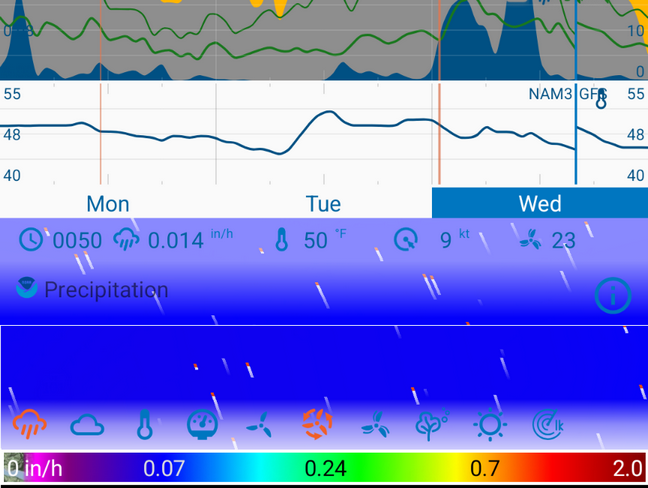
This image isn’t too bad but sometimes nothing is legible top or bottom.